A real report,
nothing blurred out
Most vendors ask for your URL and your email before showing you anything. Here is a complete GotAlt report, in full, on a page we broke on purpose — so you can judge the output before you spend a minute on your own site.
The page being scanned is Fern & Field, a fictional shop. It is live, and every fault in it is deliberate — so you can run WAVE or axe DevTools against it and check our work.
The report
gotalt.com/sample-report/demo-site/
1 page scanned · 14 issues traced to 10 root causes · 8 images, 6 of them checked against the picture
5 of the 6 images have an alt text problem that every rule engine passes. That is the part of this report you cannot get anywhere else.
How the score works
Each finding is weighted by severity (critical 10, serious 5, moderate 2, minor 1), multiplied by how many times it occurs — capped at 5 instances per check so one repeated fault can't sink everything — and subtracted from 100. Here that comes to 63 points of deductions, so 37. The score is a prioritisation aid, not a measure of compliance. A site can score well and still be unusable with a screen reader. The full method.
Part 1 — what any scanner finds
These are the structural faults. They're real, they matter, and a free tool will find them too. We're not going to pretend otherwise.
| Finding | Severity | Count | WCAG |
|---|---|---|---|
Images with no alt attribute at all | Critical | 2 | 1.1.1 |
| Form fields with no label | Serious | 3 | 3.3.2 |
Page language not declared on <html> | Serious | 1 | 3.1.1 |
| Link with no accessible name (icon only) | Serious | 1 | 2.4.4 |
Iframe with no title | Serious | 1 | 4.1.2 |
| Pinch-zoom disabled in the viewport tag | Serious | 1 | 1.4.4 |
Positive tabindex hijacking keyboard order | Moderate | 2 | 2.4.3 |
No top-level <h1> on the page | Moderate | 1 | 1.3.1 |
Heading level skipped (h2 straight to h4) | Minor | 1 | 1.3.1 |
Duplicate element id | Minor | 1 | 4.1.1 |
Part 2 — what only opening the images finds
Six images on this page have an alt attribute, so every rule engine marks them passed and moves on. We downloaded each file and asked a vision model whether the words match the picture. Five of the six do not.
-
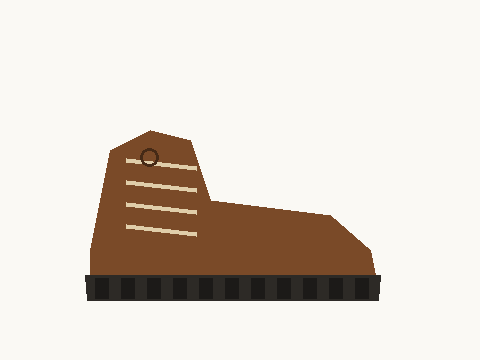
boot.png — current alt text
"banner2"
The image actually shows: a brown leather hiking boot photographed side-on, with lace hooks and a black lugged sole.
A leftover filename. It tells a screen reader user nothing, and it passes every rule engine because the attribute is present and non-empty.
Suggested: Brown leather hiking boot with lace hooks and a lugged rubber sole
-
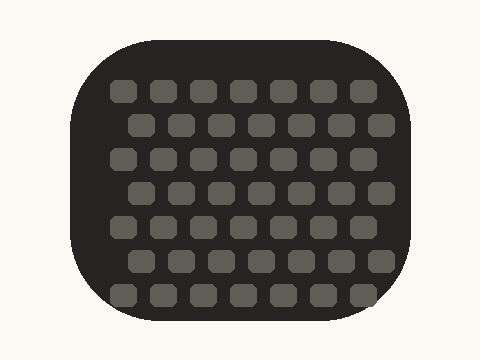
sole.png — current alt text
"Our team at the 2025 trade show"
The image actually shows: a close-up of a black rubber outsole with deep grey tread lugs.
The alt text describes a completely different photograph — the classic result of copying a block of markup between pages. A blind shopper is told this is a team photo. No structural check can catch this, because nothing about the HTML is malformed.
Suggested: Close-up of the boot's lugged rubber outsole
-
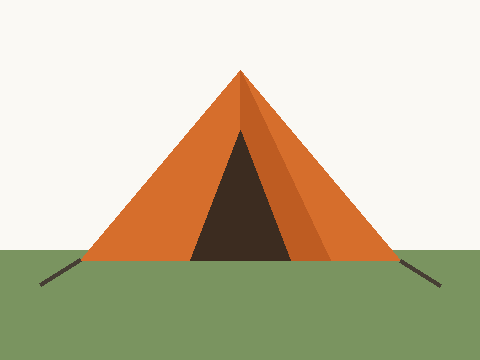
tent.png — current alt text
(empty —
alt="")The image actually shows: an orange two-person tent pitched on grass, with guy lines staked out.
An empty
alttells assistive technology to skip the image entirely, which is right for decoration and wrong here — this is the product. A screen reader user browsing the shop never learns the tent exists. Rule engines treatalt=""as a deliberate, correct choice, so this is invisible to them by design.Suggested: Orange two-person tent pitched on grass
-
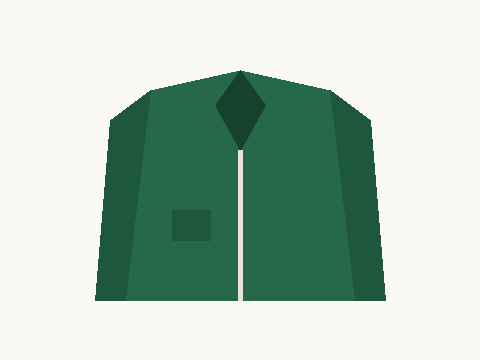
jacket.png — current alt text
"product"
The image actually shows: a dark green waterproof jacket with a hood and a zipped chest pocket.
Not false, just useless. It conveys nothing a shopper could act on — not the colour, not the type of garment, not one distinguishing feature.
Suggested: Dark green waterproof jacket with a hood and zipped chest pocket
-

divider.png — current alt text
"Decorative gradient divider graphic"
The image actually shows: a horizontal green-to-purple gradient stripe carrying no information.
The opposite mistake to the tent. This really is decoration, and describing it makes a screen reader read out a sentence of noise on every page that uses the stripe. The alt text is accurate — and that is exactly why no rule can flag it.
Suggested:
alt=""so assistive technology skips it -

backpack.png — current alt text
"Blue 40-litre hiking backpack with side pockets and a top handle"
The image actually shows: a blue hiking backpack with two side pockets and a top carry handle.
Nothing to change. We report the passes too — a tool that finds a problem with everything is a tool you stop trusting.
The point of this page, in one line
Every one of those five problems sits on an image whose HTML is perfectly well-formed. Run any rule-based scanner over this page and it will report the two images that have no alt attribute, then pass the other six. The difference is not a better rule. It is opening the file and looking.
What this report does not tell you
Published here for the same reason it's published in the product: a report that hides its own blind spots is worse than no report.
Not checked on this page
- Colour contrast — needs a browser that computes rendered styles. Use the Silktide toolbar or axe DevTools.
- Keyboard traps, focus order and focus visibility — needs real interaction, not markup analysis.
- Screen-reader announcement order — needs an actual screen reader and a person listening.
- Anything JavaScript injects after load — we read the HTML your server sends.
- Whether the copy is understandable — cognitive accessibility is judgement no tool should claim.
A perfect GotAlt score would not mean this shop is accessible, and it certainly would not mean it is legally compliant. It would mean the faults a machine can find are gone, and the human review can start from a shorter list.
Now run it on a page of yours
The rule findings in Part 1 are free and unlimited-ish — 5 scans a day, no signup. The image checks in Part 2 are the ones that cost us money to run, so the free tier covers 6 images at a time.
Check if my alt text is actually rightNow run it on a page of yours
The rule findings in Part 1 are free: 5 scans a day, up to 3 pages each, no signup.
Scan my site — free