Alt text checker: is your alt text true?
This free alt text checker reads a page, downloads its images and checks whether each image's alt text is true of the picture, not just present. It flags alt text that is wrong, vague or a filename, and decorative images that are being read out, for the first six described images on the page.
Published . Last reviewed .
Free · No account, just an email address once · One check a day · Verifies the first 6 described images on the page
Loading your page
Results
Each verdict, description of what an image shows and suggested alt text below was written by an AI model (Claude, from Anthropic) and is labeled AI-generated. It can be wrong, so check each one against the image. Your page's own alt text is shown as it is on your page. How GotAlt uses AI
That was up to six images on one page
Check up to 50 pages once, $49, no subscription, and get a list of the images whose alt text may not match the picture, with a fix sheet to work through. Or have your pages re-checked on a schedule, so a new upload that breaks something gets flagged: start a plan online in a couple of minutes, with a full refund within 7 days of your first payment.
Check my site once from $49 Monitor your pages every week from $29/moUp to 250 pages costs $149. Both sizes include a fix sheet with drafted alt text for each flagged image, and one re-check within 30 days. See a sample fix sheet (CSV file)
Many product images? The Bulk Alt Text Pack returns model-checked drafts to review before you import, for up to 500 product images, $29 once.
What the verdicts look like
Two of the eight images in our sample report, a shop we broke on purpose. Both have alt text, so a rule that only reads the HTML passes both. The checker tells them apart by looking at the pictures.
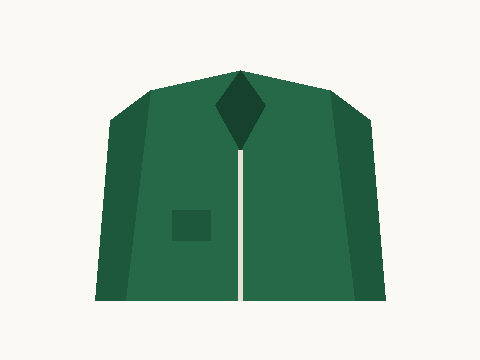
Alt text "product"
Too vague AI-generated The image shows a dark green waterproof jacket with a hood and a zipped chest pocket. The alt text is not false, but it names no color, garment or feature.
Suggested Dark green waterproof jacket with a hood and zipped chest pocket

Alt text "Blue 40-litre hiking backpack with side pockets and a top handle"
Accurate AI-generated The image shows a blue hiking backpack with two side pockets and a top carry handle. Nothing to change.
The verdicts and the descriptions of the images are written by an AI model (Claude, from Anthropic) and can be wrong, so check each one against the image. How GotAlt uses AI
Why "has alt text" isn't the same as "has good alt text"
What HTML-only checkers verify
- The
altattribute is present - It isn't empty on a meaningful image
- It isn't suspiciously short or long
- It doesn't look like a filename
All of this is done by reading text. The image file is never opened.
What this checker verifies
- The description is true of the image
- It isn't describing a different picture entirely
- It isn't so generic it conveys nothing
- Decorative images aren't being narrated
Requires downloading the image and looking at it, one image at a time, so the number checked on a page is capped.
What makes this different
Most accessibility checkers read the HTML around an image. This one fetches the image file itself and compares it with its alt text, using a vision model. We measured how often that comparison is right on 124 labeled alt texts (62 correct, 62 with a planted error), each checked three times: it left about 98% of the correct ones alone and flagged about 98% of the planted errors (182 and 183 of 186 verdicts). Read the full results, misses included.
Questions
What counts as bad alt text?
The checker gives each image one of four verdicts. Accurate: the alt text conveys what a sighted person gets from the image. Inaccurate: the words describe something the image doesn't show, often a copy-paste from another product, or the alt text is a filename or placeholder such as IMG_4021.jpg or banner2. Too vague: technically true but useless, like "product" on a photo of a specific boot. Decorative mismatch: a description on an image that carries no information, which makes screen reader users sit through noise, or an empty alt="" on an image that does carry information, which hides it from them. Our alt text guide covers how to fix each.
Do you store my images?
No. Images are fetched, passed to the vision model for the verdict, and discarded when the request ends. We do not keep the images. We do keep the email you give to unlock the tool and a count of today's runs, as our privacy policy explains.
Why only six images?
Because each check downloads the page's images and sends every one to a vision model. Tools that check alt text by reading HTML only can run without limits; this one opens the pictures. Paid plans raise the cap and work through your pages in bulk.
What if the page needs JavaScript to show its images?
We read the HTML your server sends, so images injected later by JavaScript won't be seen. If your site is a single-page app and the result looks empty, that's why. Server-rendered and static sites work as expected.
Is the AI ever wrong?
It can be, so it is tuned to stay quiet rather than guess: a false accusation wastes your time. Every verdict shows what the model saw in the image, so you can confirm it at a glance, and you stay the final judge of what your image communicates in context.
How accurate is it?
In our own test of 124 labeled alt texts (62 correct, 62 with a planted error), each checked three times, the production setting left about 98% of the correct ones alone and flagged about 98% of the planted errors (182 and 183 of 186 verdicts). Most misses were look-alike patterns and ambiguous details. It is a vendor-run test on product photos, so read the full results and their limits.
Is an empty alt attribute ever right?
Yes. A purely decorative image should have alt="" so screen readers skip it, and this checker treats it that way. Leaving the attribute out altogether is different: a screen reader may read the file name instead. The alt text guide has the decision tree.
Is this the same as an alt tag checker?
Yes. People often say "alt tag", though strictly alt is an attribute of the img tag. An alt tag checker usually only confirms the attribute exists; this one also checks what it says.
Does alt text help SEO?
Google says it uses alt text, along with computer vision and the page's content, to understand images, and its image guidance warns against keyword stuffing. Alt text written for a listener is usually what search engines want too.
How do I fix what it finds?
Rewrite the alt text in your site's editor so it says what the image shows and why it is there. The free alt text generator drafts a description to start from, and alt text examples shows good and weak versions for each kind of image.
Alt text is one check of many
The free scan also checks form labels, headings, link text, page language, zoom settings and more. It runs 16 rule-based checks across up to three pages.
Scan my site for freeFound this useful? Link to it
A link from your site, newsletter or resources page helps other people find this free tool. Copy it here: