Free scan
16 rule checks on up to 3 pages, the same class of checks other scanners run.
Free, no signupAccessibility checks that open your images
Scan up to three pages free, then have a vision model compare each image with its alt text.
Free · No signup · 16 rule checks on up to 3 pages
Not ready to hand over a URL? See a real report first
The score ranks what to fix first. It is not a compliance rating.
AI-generated An AI model (Claude, from Anthropic) wrote this plan from the list of issues in your scan. It can be wrong, so check it against the findings below. How GotAlt uses AI
These are the failures any scanner can detect: attributes that are missing or malformed.
Free, one a day. Rule engines can only check whether alt text exists. We fetch your images and check whether the alt text is true, plus whether your link text and headings make sense to someone who can't see the page.
An AI model (Claude, from Anthropic) writes each finding, and every finding is labeled AI-generated. How GotAlt uses AI
Automated checks cover part of WCAG. Keyboard navigation and focus visibility need a person testing the page, and color contrast needs the rendered page: our free bookmarklet measures it on any live page. Treat this report as a strong starting point, not a compliance certificate; no automated tool can promise one. Our full accessibility checklist covers both kinds.
This scan read up to three pages. Check up to 50 pages once, $49, no subscription, and get a list of the images whose alt text may not match the picture. To have your pages checked every week instead, with an email when a check finds a new critical or serious issue, monitor your pages every week from $29/mo. What each one includes and what it leaves out is on the pricing page. Our privacy policy explains what we keep and for how long.
Up to 250 pages costs $149. Both sizes include a fix sheet with drafted alt text for each flagged image, and one re-check within 30 days. See a sample fix sheet (CSV file)
Real examples from our sample report
Rule engines can only check that alt text exists. We open each picture and check that it is true.
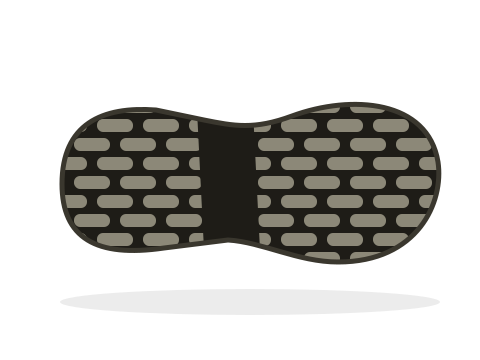
<img src="sole.png" alt="Our team at the 2025 trade show">
The image shows a close-up of a black rubber outsole. The alt text describes a different photograph, a common result of copying markup between pages.
SuggestedClose-up of the boot's lugged rubber outsole
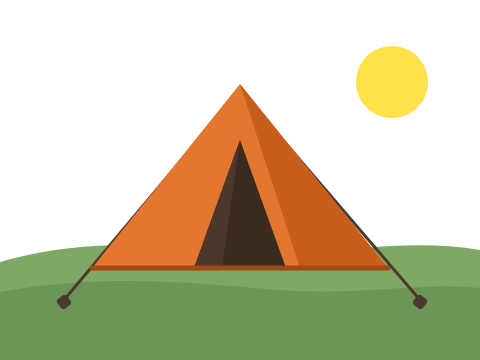
<img src="tent.png" alt="">
The image shows an orange two-person tent pitched on grass. An empty alt tells a screen reader to skip the image, and here the image is the product.
SuggestedOrange two-person tent pitched on grass
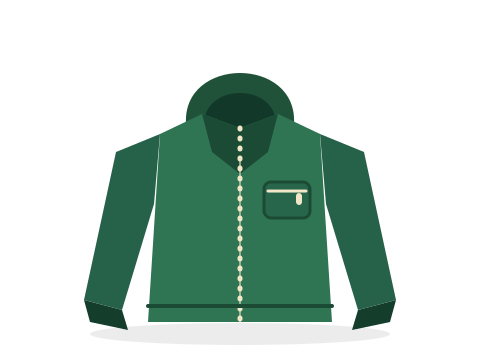
<img src="jacket.png" alt="product">
The image shows a dark green waterproof jacket with a hood and a zipped chest pocket. Not false, just useless: nothing a shopper could act on.
SuggestedDark green waterproof jacket with a hood and zipped chest pocket

<img src="backpack.png" alt="Blue 40-litre hiking backpack with side pockets and a top handle">
The image shows a blue hiking backpack with two side pockets and a top carry handle. Nothing to change. We report the passes too.
5 of the 6 images checked in our sample report, a shop we broke on purpose, have an alt text problem that every rule engine passes.
The verdicts, the descriptions of the images and the suggestions are written by an AI model (Claude, from Anthropic) and can be wrong, so check each one against the image. How GotAlt uses AI
How it works
16 rule checks on up to 3 pages, the same class of checks other scanners run.
Free, no signupA vision model compares each image with its alt text, up to six images per page. We change nothing on your site.
Free, one a day How the deep audit worksWe recheck the pages you choose every week and email you when a check finds a new critical or serious issue.
From $29/mo See plans and pricingWhat a weekly check gives you
A redesign, a theme update or a swapped product photo can leave a description wrong, and nothing on the page says so.
When a check finds a new critical or serious issue, we send the page and what we found, so you can act while the cause is still easy to trace.
6 new accessibility issues on https://gotalt.com
We found 6 new issues on pages you're monitoring: 6 critical. These weren't there last time we looked, so something changed:
GotAlt: 6 issues open on your site
Your last 28 days: we ran 4 checks across 1 page. Open and worth fixing: 6 (of 7 total, including minor).
Each issue keeps its history: first seen, last confirmed and what the recent checks did. Export a CSV file or print a report.
It records what was checked and when. It is not a certificate.
| Current alt | AI draft |
|---|---|
| Our team at the 2025 trade show | Close-up of the boot's lugged rubber outsole |
| (empty, marked decorative) | Orange two-person tent pitched on grass |
| product | Dark green waterproof jacket with a hood and zipped chest pocket |
Drafts are written by an AI model. Check each one against the image. Free alt text generator
Main-content images come first, ahead of header, navigation and footer images.
AI-generated The marks are verdicts from our sample report.
100 pooled pages cover unlimited client sites, and each client's share is shown so you know what to charge.
+$1.30 per extra pooled page a month. See the Agency plan
GotAlt is not an accessibility overlay. There is no widget or badge to maintain, and nothing runs on your visitors' screens. Overlays and the FTC
Why it matters
3,117
federal website-accessibility filings under the ADA in 2025, up from 2,452 in 2024.
Source: Seyfarth Shaw's ADA Title III tracker, 2025. Missing alt text and unlabeled form fields are among the most common failures WebAIM finds on home pages (WebAIM Million), and both are what the free scan finds. Public-sector sites have their own deadline: Title II now lands in April 2027 for larger entities and April 2028 for smaller ones.
June 28, 2025
The European Accessibility Act has applied since this date. It covers most companies selling online to EU consumers, wherever they are based; microenterprises providing services are exempt.
In June 2026 a French court ordered a grocery retailer to make its website and app accessible (reported by Handicap.fr).
Read our EAA guide, see which accessibility laws apply to you, compare laws by country or browse the 86 WCAG 2.2 success criteria.
This is general information, not legal advice.
Pricing
Pay once for a check, or pay monthly to have your pages watched every week.
Pay once
A list of the images whose alt text may not match the picture, and a fix sheet to work through. No subscription.
Check my site once from $49$49up to 50 pages
$149up to 250 pages
Every page gets the 16 rule checks, and up to six images a page, main-content images first, are judged against their alt text. One re-check within 30 days of the first check finishing. An automated check, not a manual audit. A full refund within 7 days of paying if the check could not run on your site or most of its flags are wrong.
$29/month
1 site, 20 monitored pages
No added pages: for more than 20 pages, choose Professional.
Monitor my site from $29/mo$69/month
1 site, 50 monitored pages
+$1.40 per extra page a month.
Start Professional$229/month
100 pooled pages, unlimited client sites
+$1.30 per extra pooled page a month.
Start Agency5 rule-based scans a day on up to 3 pages, one deep audit a day, and free in-browser tools, unlimited.
Scan my site for freeThe plans carry a full refund within 7 days of your first payment, and you can cancel from your account page at any time. The Site Image Check has its own refund line, on its card above. Prices are in US dollars, excluding taxes. Payment is taken by Stripe.
What a GotAlt report is
No, and be wary of any tool that says otherwise. Automated checks cover part of WCAG, the technical standard behind the EAA, ADA cases and Section 508. Full conformance also needs a person to review things like contrast, keyboard flows and clarity. GotAlt finds the issues machines can find and tells you what is left.
It fetches your page, plus up to two linked pages, and runs 16 rule-based WCAG checks on the HTML. The deep audit then downloads your actual images, up to six per page, and asks a vision model whether each alt text truly describes its image. We don't inject widgets or modify your site.
A rule-based scanner checks that an alt attribute exists. GotAlt runs those checks too, then opens your images and checks that each alt text is true of the picture. A weekly re-check emails you when a check finds a new critical or serious issue. The longer argument, including where rule engines beat us
WCAG is the technical standard behind the EU's European Accessibility Act, the US ADA and Section 508, and the UK Equality Act. The free scan runs 16 rule checks, 13 of them mapped to WCAG success criteria; it does not assess whether a site meets any law. Accessibility laws by country
Free scan and audit results are returned to your browser and not kept on our side. For paid monitoring we store the pages you ask us to watch and their weekly check history, because tracking change over time is the point. Details are in our privacy policy.
Scan up to three pages free, then see whether the alt text on your images is true of the pictures.
Scan my site for free Check my site once from $49A link from your site, newsletter or resources page helps other people find this free tool. Copy it here: